
How Can We Help?
Search for answers or browse our knowledge base.
-
Retro C
-
-
- Articles coming soon
-
- How to Replace the Retro C's Computer
- Configuring the Touchscreen Computer's "Power-On"
- How to replace micro USB on the display computers
- How To: Transfer Files to the Retro C
- How to replace the USB hard drive on the touch screen computer
- New computer set bios power on
- Old computer set bios to power on
- TouchScreen Flip / Mirror Issue
-
-
-
- Stuck Angle or Centerline - How to Recover & Recalibrate
- Replacing an Angle Encoder
- Angle movements over run when going to position.
- Angle (Arch) Movements - Overview
- Angle Chains - Proper Chain Tension
- Diagnosing Unknown Noises Coming from Blade Motor
- Pivot Point Check
- Power or Wiring Troubleshooting for Angle Motors or VFDs
- Dirty Slide
-
- Stuck Angle or Centerline - How to Recover & Recalibrate
- How To: Calibrate Centerline 1-5
- How To: Calibrate Centerline 1-5 (Advanced)
- Centerline (Vertical) Movements - Overview
- Replacing a Centerline Encoder
- Replacing a Centerline Gearbox
- Checking the Centerline Maximum & Minimum (Max & Min) Height Setting
- How to Tighten the Centerline Slides
- How To: Tension The Centerline Chains
-
-
-
- Common Retro C issues and solutions
- Countdown Timer / E-Stop Troubleshooting
- Scrap Belt or Scrap Incline VFD Disconnected: Troubleshooting
- Stuck Angle or Centerline - How to Recover & Recalibrate
- TouchScreen Flip / Mirror Issue
- Troubleshooting: Encoder Unplugged Error
- Troubleshooting: The Stationary or Carriage Side Horizontals Won't Move Anymore
-
-
Linear Pickline
-
Plant One Projection
-
SmartConveyor
-
Sticker Printer
< All Topics
Print
How to Tighten the Centerline Slides
Updated
Warning: Before entering the saw make sure you have engaged the emergency stop with the key and take it with you as well. Always lock out, tag out the machine during maintenance in accordance with all local and/or company policies.
The purpose of this article is to explain how to tighten the centerline slide enough so that vibration does not allow it to move during setup while allowing it to move during normal operation.
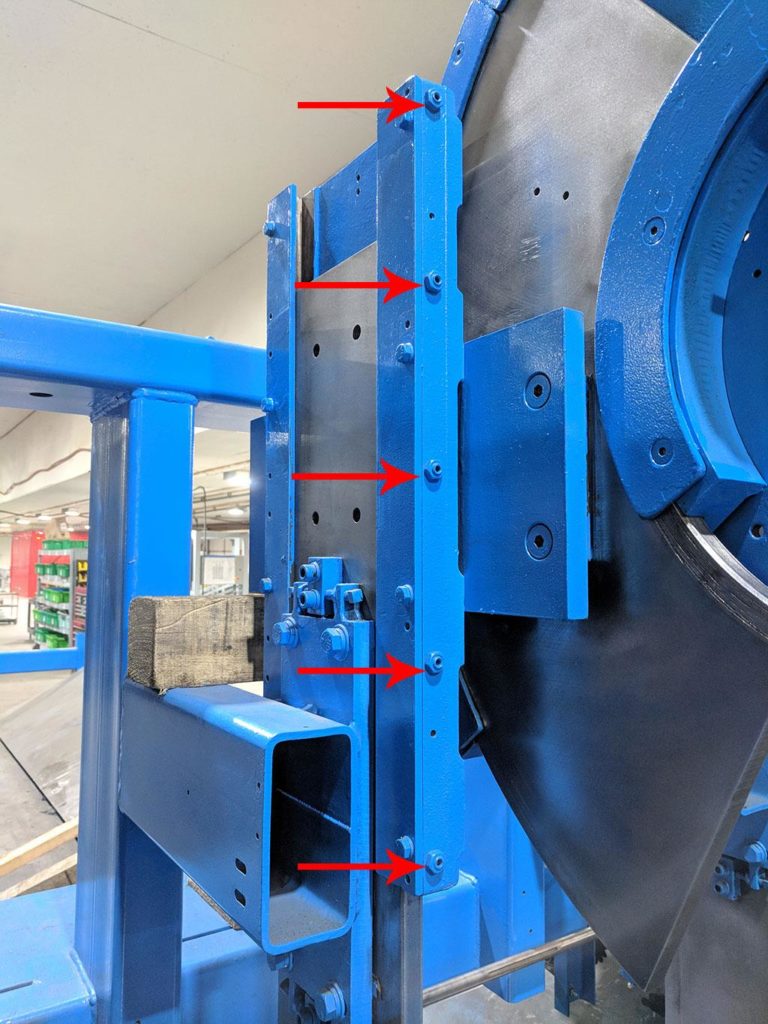
- Tighten the set screw evenly 1/4 turn. This will add a little drag to the axis. Too tight and the axis cannot run properly. Manually move the centerline up and down a few times to confirm it does not stall while moving. If it stalls the bolts are too tight.
- Run the saw for a few hours or up to a day.
- Verify its properly tightened by going to the check screen and then choosing the “Axis Stats” button
- To check for slipping look at the Rerun column. Compare the ratio of Rerun to the Setups column. Too many reruns indicate a slipping issue. (Ignore this for the carriage axis).
If the “Rerun” column is higher on one axis than the rest then it needs to be tightened more. See the image below.
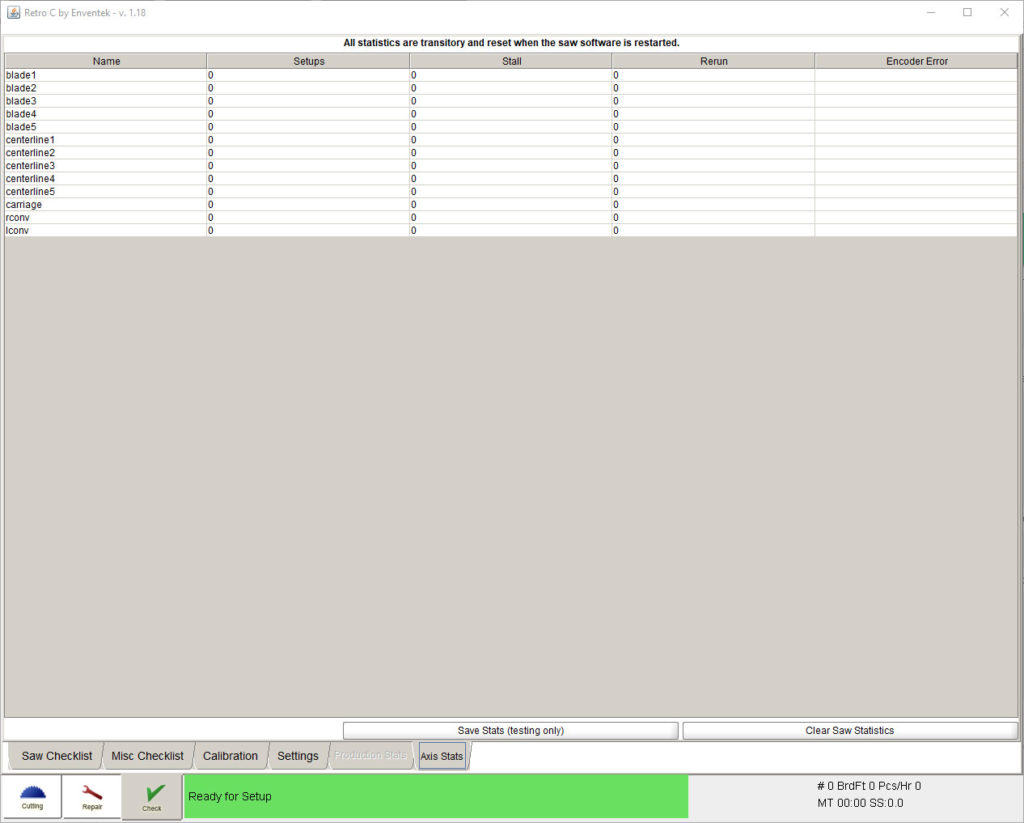
Table of Contents